S60, S80, V70 -2003, XC70 -2003, XC90 2006-
CEM |
93C86(*), 28F400 |
ECU |
93C56, 24C04, 95P08 |
(*) Supported units with Serial Nr. 00005XXXXXX and higher
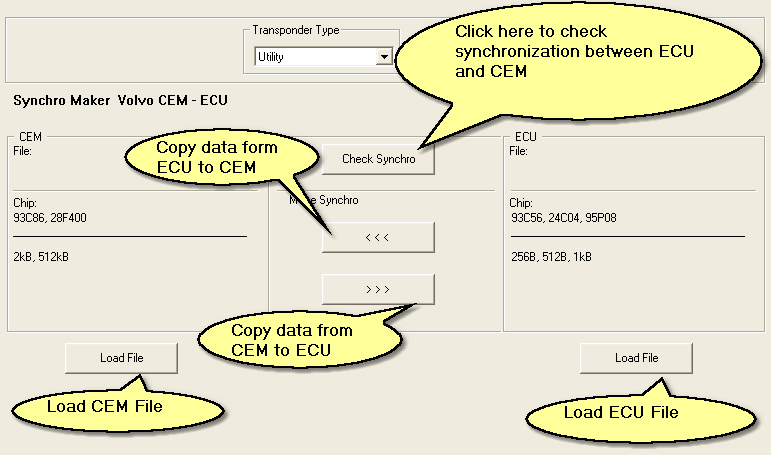
Intro
This tool allows to deal with synchronization between ECU and CEM.
In some situations ECU or CEM have to be replaced with used ones. In case the units are taken from different cars it is necessary to "pair" them.
The tool makes possible to check if the units paired and to make this if necessary..
Getting started
1. Load CEM file. Click the left "Load File" button
2. Load ECU file. Click the right "Load File" button
3. Check synchronization. Click "Check Synchro" button. If the units are paired you will get the confirmation message. Otherwise an error message appears.
4. Restore synchronization (if needed). There are two buttons on the interface. One of them transfers necessary data from ECU to CEM, the other transfers from CEM to ECU.
The choice depends on your preference. Physically there is no difference which unit's data is copied. In case the CEM is based on 28F400 it could be a good idea to copy from CEM to ECU.
In this situation you will need to change small eeprom in ECU. Otherwise you have to rewrite the flash memory 28F400, that is more difficult.
5. Save the new file. After clicking one of buttons "Make Synchro", Tango asks to save a new file.
6. Write the new file to CEM/ECU